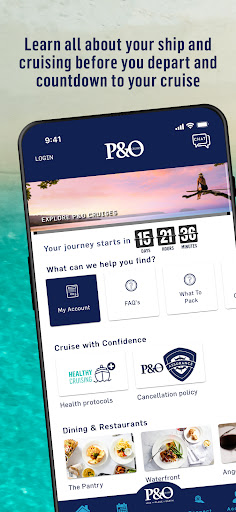
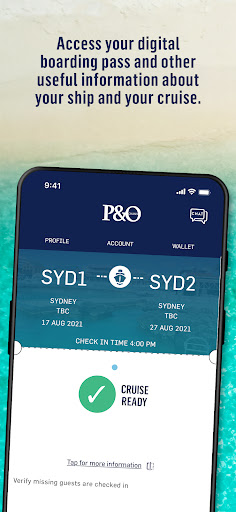
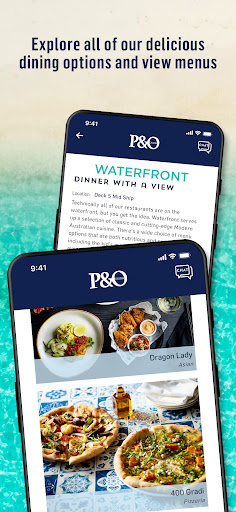
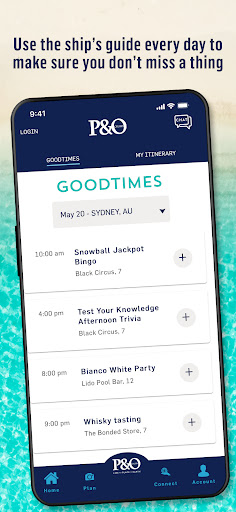
The P&O Cruises app makes cruising even easier. Download before your cruise departs and you can access your boarding documentation, explore and familiarise yourself with your ship and the endless choices at your disposal, check out the restaurants and menus, bars, entertainment and more. It will help you navigate your way around your ship and really make the most of your holiday.
Plus, you can use the app free of charge via the onboard Wi-Fi.
Before your cruise
Get prepared to relax! Sign in to the app and you’ll be able to see:
• Your booking information
• Your cruise countdown begins and is shown here
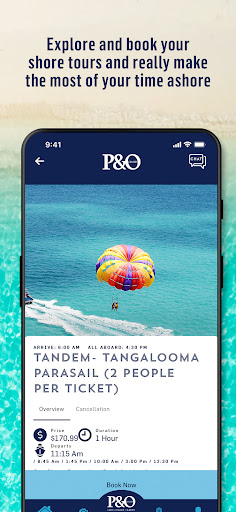
• Explore shore tours
• Check out our restaurants and great value drinks packages
• Learn all about your ship – activities, entertainment, spa, fitness and more
Once You’re Onboard
You’re on holiday! Connect to the ship’s Wi-Fi (free of charge) and you can:
• Check out today’s weather, ship’s time, arrival/departure times and important port information
• Use the deck plan guides to familiarise yourself with all of your ship’s features and navigate your way around
• Check out today’s menus and make dining reservations
• Book classes, spa treatments, Edge Adventure passes and more. You’ll get notifications to help you remember (after all, you are on holiday)
• Chat with your family/new found friends
• Check out Good Times, our daily guide of what’s happening, where and when. Plan your day, book classes and make sure you don’t miss a thing
• Order our famous barista-brewed coffee
• Review all the amazing shore tours available on your cruise and make a booking (if you haven’t already)
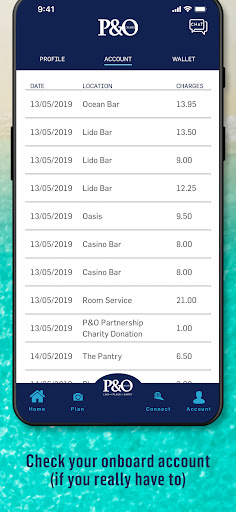
• Check your onboard account (only if you really want to)
• Have immediate access to P&O Cruises latest offers and book your next cruise while onboard for added benefits
• Use your digital cruise card for contactless payments.
Stay tuned as our app continues to evolve with even more functionality and features to ensure your P&O Cruise is Like No Place On Earth. In the meantime, we would love your feedback and suggestions.
We can’t wait to welcome you onboard.
If you’re an Android user and don’t download the app from the official Google Play Store, you may find the installation process more complicated than usual.
But we are delighted to inform you that you don’t need to worry. To ensure you could install this app smoothly, we have written and uploaded a detailed tutorial. It would guide you on installing an app after downloading it from our website step by step, with the help of pictures.
You may find this helpful article on the downloading site, or visit How to install APK/XAPK files on Android.
If you need further help, please do not hesitate to contact us via email [email protected].
We fully understand your concern about safety. We agree that one person wouldn’t be too careful in the cyber world. Meanwhile, we are happy to tell you that one of our priorities is to provide our users with safe app files that they can use without any worries.
We guarantee that all the app files we provided originate from official and reliable sources. We promise that they do not contain any malware that will harm your hardware or the safety of your privacy.
We are glad to let you know that the vast majority of apps on our website are available for free download. Only a small selection of apps require payment, and their prices are set solely by the respective developers—we simply provide an official and secure download platform.
Rest assured, whether an app is free or paid, every download link on our site is verified and completely safe. You can download with confidence, and no account registration is needed—just click the download button and you're all set!
Recently we received a lot of emails from our users, which said they couldn't log in for different reasons, such as "forgot the user name or password" or "had a new phone." We are willing to help you out. Please read the notes below to see what we can do.
To answer this question, please first let us know which account you’re referring to.
If you're referring to your account of some app, like your Facebook account or your Youtube account. Unfortunately, we would not be able to help in this case. We would suggest you turn to the customer service of this application.
If you’re referring to your Appurse account, we should apologize for your confusion since there is no Appurse account. We never require registration for our service, and you will not find any procedure related to creating an account or registering on our website.
This question is essentially quite similar to the prior one. It’s a pity that we are unable to help you to cancel the subscription to a third-party application directly, while we would suggest you to contact its customer service for further information.
Sorry that we are unable to help you to get a refund from a third-party application directly. If you wish to get a refund from a third-party app, we would suggest you to contact its customer service. We would be happy to provide you the way to contact them.
If you want a refund from us, we should apologize for your confusion. Our service is 100% free, and any payment information is not required.
If you run into any site that asks you to provide your payment information, be careful. Remember never reveal your payment information to any unauthorized third parties, no matter how attempting their offer may seem.
Sorry that we cannot answer this question directly, for this only aims to answer some general questions. You may find how to use a certain app by checking our review page.